General Logo Table of Contents MathBits.com Terms of Use TI-84+ Main Page MathBits Home Page TI-Nspire Main Page

TI-Nspire: Evaluate Functions

We will be working with the Calculator application.
If you need more information on entering values, see "Entering Values and Expressions".

This lesson will look at how functions are entered on the screen, and how to evaluate those functions. We will use the f (x) notation to define our function.

Task: Evaluate f(x) = x2 + 6x + 8 for f (4) and f (6.2).

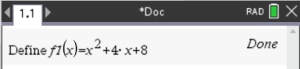
Option 1: "Define" a Function - Assign a Name

Use the Define Tool:
• Open a "Calculator" page: , #1. Actions, #1 Define

• Enter the function name: Define f1(x) = x2 + 6x + 8,

• The function "name" can be now be found under the key.
To "evaluate", just use the function name under , followed by the desired value, hit .
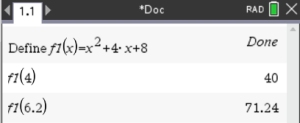


This process assigns a name to the function, and saves that name as a "variable". It is now possible to refer to the function by "name" and not have to retype all the variables and symbols each time we want to use the function. This process is referred to as "defining".


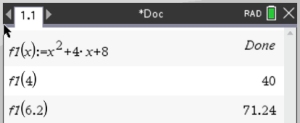
Option 2: Express Function using "Colon-Equals"
The "colon equal"symbol is found above the key.

• Type the function replacing the "=" sign with the ":=" symbol.
f1 (x) : = x2 + 6x + 8

This method is fast and easy.


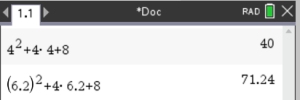
Option 3: "Direct Substitution" into the Function"
f1 (x) = x2 + 6x + 8

Type the expression represented by the function, replacing the x-variable with the needed value.

This method is more tedious to type, but it is a reliable way to obtain the answer,


Table of Contents | MathBits.com | Terms of Use